Ticket & Case Resolution
Haven’t We Fixed This Before?
A customer says their login fails after they turned on SSO. It sounds familiar. You’re pretty sure someone fixed it a few months ago, but was it in a ticket, a help article or a chat thread? Before you start from scratch, you wonder.
Haven’t we fixed this before?
Probably. Fixes live in old tickets, the knowledge base and engineering notes. The hard part is finding the one that matches this customer’s version.
Think of Atolio as your team’s case history, searchable in plain language. Describe the problem, and it brings back the known issues, the fix and the article worth sharing, with a link to each source.
Example: A Known Issue
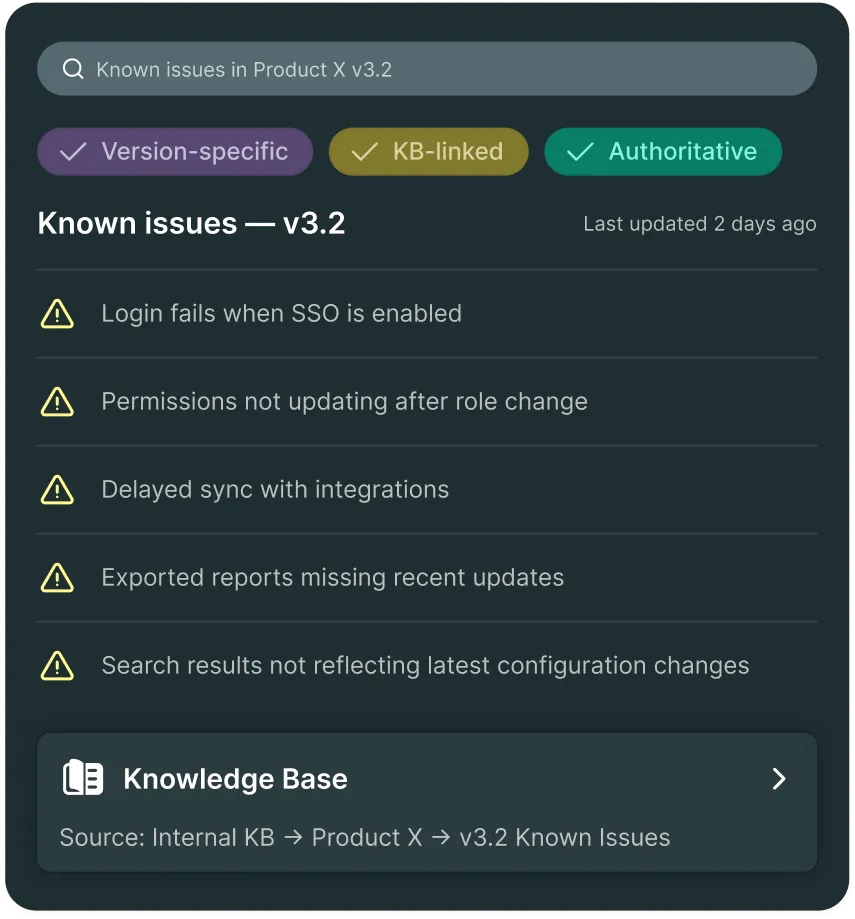
What to Expect
How Atolio Found It
You asked about one product version. Atolio searched your tickets and knowledge base, pulled the known issues for that version and linked the article that covers them.
Each one links to its source. So before you reply, you can open the article and make sure you’re sharing the right version with the customer.
Avoid These Traps
- Starting every reply from scratch. A teammate may have answered the same issue before. Ask “How did we resolve [issue] last time?” and build your reply from there.
- Searching only the knowledge base. The fix may live in a chat thread or an engineering ticket instead. Leave out the source and Atolio checks every connected app.
- Leaving a new fix undocumented. If you solved something new, write it up in the ticket or an article. Once it’s saved, Atolio can find it for the next person who asks.
What Atolio Does (and Doesn’t)
- Find past fixes and known issues
- Link the article worth sharing
- Answer your follow-up questions
- Reply to customers without your input
- Show you anything you can’t access
- Know fixes nobody wrote down
Try It: Your Next Ticket
Has [error message] come up before, and how was it fixed?Key Takeaways
- Find out how the issue was solved before
- Search every connected app, not just the KB
- Make sure documentation exists today