Expansion & QBR Prep
What’s Changed Since We Last Talked?
Your QBR is on Thursday. Since the last one, there have been support tickets, a few feature requests and a roadmap update you only half remember. Before you build a single slide, there’s one thing you need to know.
What’s changed since we last talked?
It’s all on record. The tickets are in your help desk, the account details are in your CRM and the roadmap lives in your docs. Pulling it together by hand just means a lot of tabs.
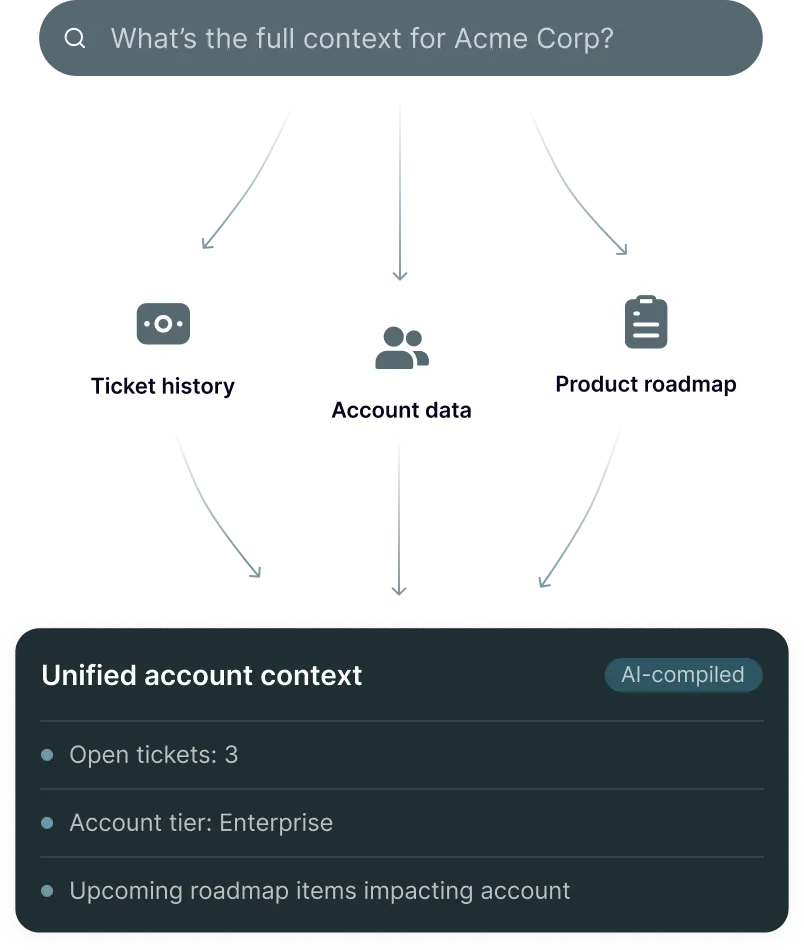
Think of Atolio as the account brief you wish you always had. Ask about the account, and it brings the open tickets, the account details and the roadmap items that affect them into one answer, with a link to each source.
Example: The Acme Corp QBR
What to Expect
How Atolio Found It
You asked about one account. Atolio searched your help desk, CRM and docs, then pulled the open tickets, the account details and the roadmap items that affect them into one view.
Each part links to its source. So when a ticket looks like a risk, you can open it and read the whole thread before the meeting.
Avoid These Traps
- Reading only the summary. Atolio’s summary is where you start. A short line like “3 open tickets” can hide a frustrated customer, so open the tickets behind it.
- Leaving out the time frame. “Open issues for Acme” can pull in tickets from years ago. Add “since our last QBR” so you see what changed this quarter.
- The answer may not exist. If a concern only came up in a conversation nobody wrote down, Atolio can’t find it. Check in with the account team before the QBR.
What Atolio Does (and Doesn’t)
- Pull tickets and account history
- Help you spot risk and expansion
- Link every answer to its source
- Talk to the customer for you
- Show you anything you can’t access
- Know things nobody wrote down
Try It: Your Next QBR
What tickets and requests has [Account Name] had lately?Key Takeaways
- Summarize what changed since the last QBR
- Ask who on your team knows the account
- Find the features they have asked for