AI Services / LLM

Overview

Atolio makes it easy to securely configure and manage access to commercial LLMs of your choice. As of v4.24, Atolio supports multiple LLM models across different providers, allowing you to select the best model for your organization’s needs.

High-level Configuration Workflow

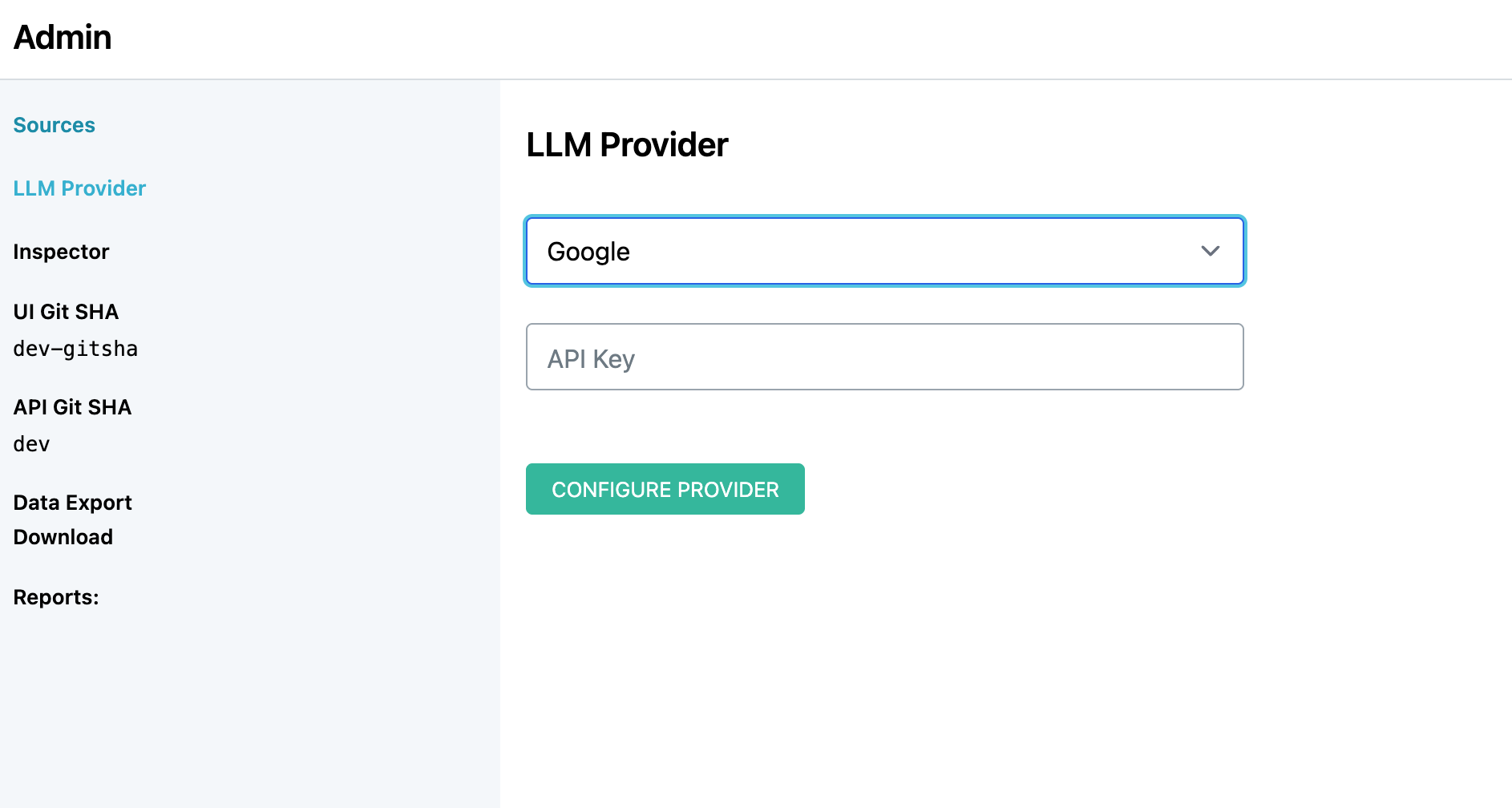
To configure an LLM provider, navigate to the administration panel at your Atolio deployment URL (e.g., https://search.example.com/admin) and select LLM Provider from the menu.

Atolio uses a range of models dependent on the use case. Per provider, the following models are currently supported:

ProviderModels
AnthropicSonnet 4.6, Haiku 4.5
AWS BedrockAsk Atolio Support for recommended models
Google GeminiGemini Flash 3
OpenAI / Azure OpenAIGPT-5.5, GPT-5 Mini

Configuration via API Key

LLM Provider API Key

For the majority of providers, an access token is required. To enable the provider:

  1. Open Atolio and head to the Admin panel

  2. Select LLM Provider from the left-pane menu

  3. Select the LLM Provider and follow the specific configuration steps:

    • Azure OpenAI

      1. Navigate to the Azure AI Foundry Portal at https://ai.azure.com/ and create a new Azure AI Foundry resource.
      2. Choose subscription, resource group, region, and resource name. Create the resource.
      3. From the service home page, open Deployments from the left-hand menu
      4. Create a new base model deployment for gpt-5.5
      5. Create an additional base model deployment for gpt-5-mini
      6. On the model deployment page, under Endpoint Settings, copy the API key and base Endpoint URL.
      7. Back within Atolio, enter the copied Endpoint URL and API Key.
    • OpenAI

      1. Navigate to https://platform.openai.com/api-keys
      2. Create a new secret key and copy it.
      3. Specify the API key within Atolio.
    • Anthropic

      1. Navigate to https://platform.claude.com/
      2. Create a new API key and copy it.
      3. Specify the API key within Atolio.
    • AWS Bedrock

      1. Ensure Atolio is deployed on an AWS instance and with the ability to edit certain IAM roles.
        • Model access has changed in AWS recently and requires IAM editing with permissions to the AWS Marketplace depending on selected LLM.
      2. Append (DO NOT REMOVE) the following policy document to the existing Marvin service role marvin_svc_act, making sure to replace <MODEL_NAME>:
      {
          {
              "Version": "2012-10-17",
              "Statement": [
                  {
                  "Effect": "Allow",
                  "Action": [
                      "bedrock:InvokeModel",
                      "bedrock:InvokeModelWithResponseStream",
                      "bedrock:Converse",
                      "bedrock:ConverseStream"
                  ],
                  "Resource": "arn:aws:bedrock:*:*:foundation-model/<MODEL_NAME>"
                  }
              ]
          }
      }
      

      Depending on the selected model, there may be third-party billing. Amazon treats external or third-party tools and billing as AWS Marketplace entities. Depending on the selected LLM, it may require extending the previous IAM role with:

              {
          {
              "Statement": [
                  ...,
                  {
                  "Effect": "Allow",
                  "Action": [
                      "aws-marketplace:ViewSubscriptions",
                      "aws-marketplace:Subscribe"
                  ],
                  "Resource": "*"
                  }
              ]
          }
      }
      
      1. Select AWS Bedrock as the provider within Atolio. The region is automatically selected based on the deployed region. For more details, see Amazon Bedrock User Guide.
    • Google

      1. Navigate to https://aistudio.google.com
      2. Create a new project and API key and copy it.
      3. Specify the API key within Atolio.

Multiple LLM Models

LLM Provider Multi

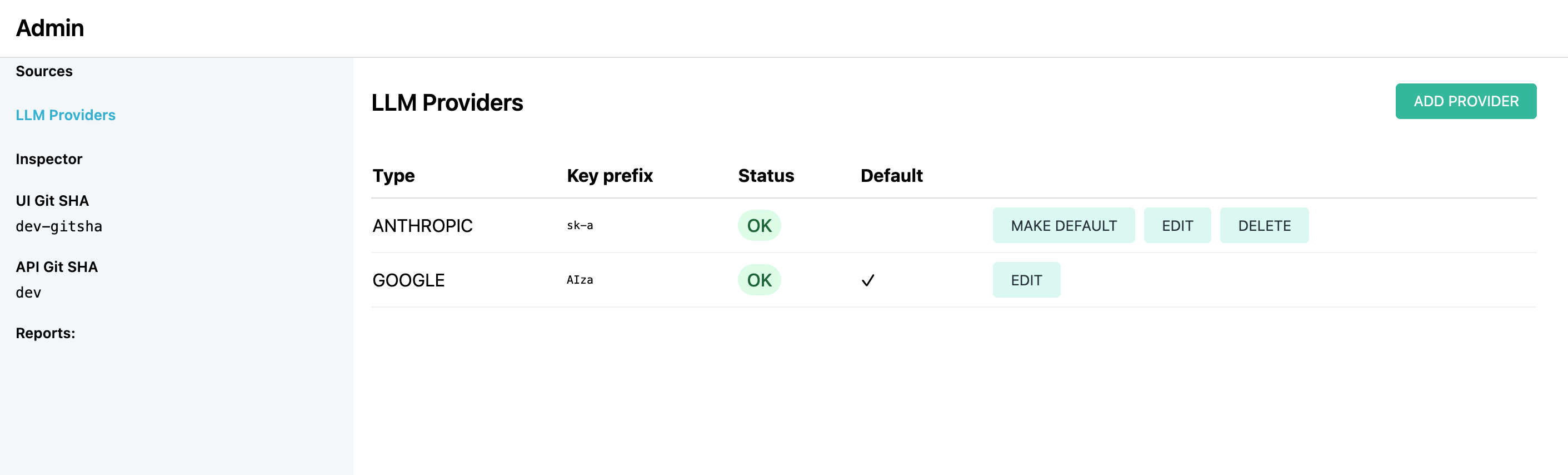
New to v4.24, you can now easily configure and manage multiple LLM providers within a single Atolio instance. While only one provider is active at a time, this flexibility enables you to test new providers, compare their performance, and maintain fallback options in case of credential expiration or service issues.

Key capabilities:

  • Multiple Provider Support: Add as many LLM provider configurations as you need. Anthropic and AWS Bedrock share the same namespace, as do Azure and Azure OpenAI.
  • Default Management: Easily switch between providers by setting any as the default with a single click. For existing systems, the first configured provider becomes the implicit default. When additional providers are added, the previous default is preserved.
  • Protected Defaults: The currently active default provider cannot be removed to ensure continuity of service.

Changing Providers

As described in the Multiple LLM Models section, you can now freely switch between configured LLM providers by setting a different provider as the default. This allows you to test new providers or change providers without requiring system reconfiguration.